Trust at the moment it matters
Identity checks and money movement need clear steps and reassuring context.
CONFIDENCE
 Product design · Fintech
UX case study / Digital banking
A premium mobile banking redesign that brings everyday money tasks, card controls, and security into one calm, confident experience.

One connected experience, from first sign-in to everyday banking.
01 — The challenge
Financial apps bring sensitive details and high-stakes actions into a small screen. The redesign focused on making the important things easier to find, understand, and trust.
Identity checks and money movement need clear steps and reassuring context.
Balances, activity, and spending patterns should be easy to scan without hiding useful detail.
Core banking, card controls, security, and help should feel like parts of the same product.
Design questionHow might we help people feel informed and in control whenever they manage their money?
02 — The process
A focused design process shaped the app around core jobs, then used prompt-led exploration to move quickly into considered screen design.
Prioritise trust, clarity, and control across everyday financial tasks and money moments.
A focused design briefGroup home, cards, analytics, profile, and settings into clear, easy-to-follow destinations.
A simpler information structureUse prompts to explore early screen directions, then critique and refine the strongest ideas.
Fast visual explorationConnect key flows with shared components, clear states, and a consistent visual system.
A connected screen setThe role of AI
Prompted screen generation was a starting point for visual exploration—not a substitute for flow decisions, accessibility considerations, or user validation.
03 — The solution
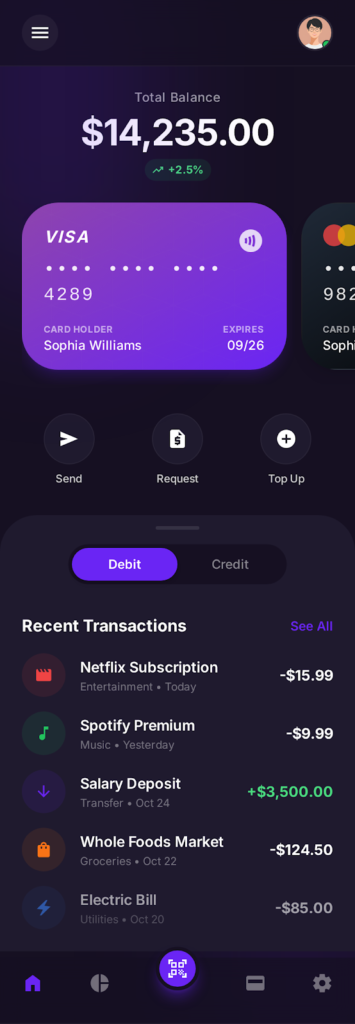
Choose a moment to explore the app screens. Each view is shown inside a mobile device frame.
Know where you stand
Balance, cards, recent activity, and quick actions sit together so people can scan their money and choose a next step without hunting through menus.
A closer look · Spending insights
Time filters and category breakdowns help turn spending data into something people can scan, compare, and act on.
Built for understanding
Readable charts. Clear categories. Context without clutter.
The interactive chart uses illustrative sample data. It does not represent measured user or product outcomes.
SAMPLE VIEW · SPENDING
Illustrative monthly mix
A gentle nudge
Recurring costs and spending trends can be easier to spot with the right context.
Explore insights ↗04 — The impact
The outcome is a coherent screen set and a set of design hypotheses ready to validate. No launch metrics or confirmed user-test results are included in this concept.
Design output
Across onboarding, account, payments, cards, analytics, security, and support.
Next to validate
OnboardingCan people complete verification with confidence?
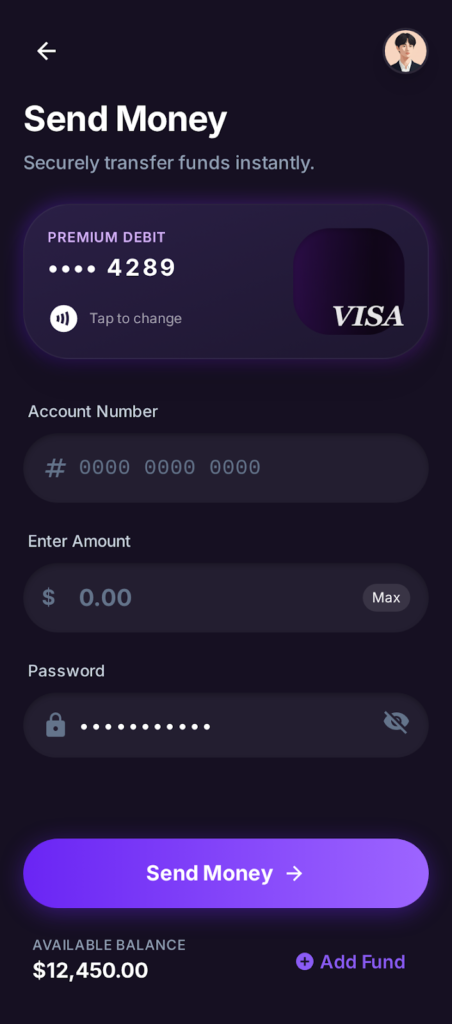
Money movementCan people review and confirm transfers accurately?
Card controlCan people find the right action when it matters?
Spending insightsCan people interpret the patterns and use them?
Design principlePremium banking is not more complexity. It is more confidence in fewer, clearer steps.
↑