
Designing Trust into AI-Assisted Pharmacovigilance Case Processing

TheraSafe — the ICSR & Safety Database module of the TheragenX drug-safety platform
A product of Synapmed, a life-sciences pharmacovigilance and clinical-development company
Role: UX / Product Design Lead (case management & AI-review workflows)
Product: TheragenX — TheraSafe (ICSR intake, data entry, medical review & E2B submission)
Client / Parent: Synapmed — AI-augmented CRO for pharmacovigilance, clinical development & real-world evidence
Platform: Desktop web application, enterprise SaaS
Users: Case processors, data-entry specialists, medical reviewers, case-processing managers
Focus areas: AI-assisted data extraction, confidence-based review, duplicate detection, workload assignment, regulatory-submission readiness
Deliverables shown: Work Queue, Assignment Center, Case Review workspace, AI Confidence review, Duplicate Case comparison, E2B validation
1. Overview
TheragenX is an AI-native drug-safety platform built by Synapmed, a life-sciences company providing pharmacovigilance, clinical-development and real-world-evidence services to biopharma organisations. The platform unifies eight modules — from case intake to signal detection, literature monitoring and regulatory submission — on one connected data layer and shared AI core.
This case study focuses on TheraSafe, the module that carries the platform’s highest-stakes, highest-volume workflow: turning an incoming Individual Case Safety Report (ICSR) — a spontaneous adverse-event report, a literature article, a call-centre transcript — into a validated, submission-ready case inside a regulated timeline.
The core design challenge
How do you let case processors trust and lean on AI-extracted data, without letting them rubber-stamp it? In pharmacovigilance, an unnoticed extraction error can mean a missed 15-day expedited report to a health authority. The interface has to make the AI’s confidence visible, make verification fast, and make it structurally hard to skip the fields that matter.
2. Background & Context
2.1 The company
Synapmed is a full-service CRO (contract research organisation) operating at the intersection of pharmacovigilance, clinical development and regulatory compliance. Its pitch to biopharma clients is built on retained oversight — “Synapmed is part of my team,” as one client puts it — rather than the black-box, assembly-line feel of typical outsourced PV vendors. That positioning matters for design: the tools have to make AI work legible and auditable to the client’s own safety staff, not just fast.
2.2 The product
TheragenX is Synapmed’s software platform, positioned as an “AI-first, unified platform” spanning discovery, clinical trials, post-marketing surveillance and real-world evidence on one connected data thread — in contrast to the fragmented, legacy point solutions most safety teams stitch together today. It ships as eight modules on a shared AI core:
- TheraSafe — ICSR intake & Safety Database — the module in this case study
- TheraSentrix — Signal detection & inspection readiness
- TheraLit — Literature monitoring for safety signals
- TheraHub — Medical information call centre & mailbox intake
- TheraIntel — Regulatory intelligence tracking
- TheraQ / TheraSure — Quality management & continuous computer-system validation
Every module writes to one tamper-evident audit trail and aligns to FDA, EMA, ICH, MHRA, 21 CFR Part 11 and GxP requirements — compliance is meant to be a property of the platform, not a layer bolted on afterwards. That principle became a direct design constraint for TheraSafe: every AI suggestion, edit and assignment shown in this case study needed to be traceable and reversible.
2.3 Why this module, why now
Case processing is where PV teams spend the majority of their headcount, and it’s the most acute bottleneck to scaling a safety operation without scaling cost linearly. TheragenX’s AI core already extracts structured data from source documents; the design problem was building the human review layer around that extraction — the workspace where a case processor, and later a medical reviewer, spends the 20–60 minutes it takes to move a case from intake to submission.
3. The Problem
Traditional ICSR processing is manual and repetitive: a processor reads a source document (a fax, an email, a call transcript, a literature PDF) and re-types the same facts — patient age, suspect drug, event term, onset date — into dozens of structured E2B fields, cross-checking each one against the source. Three things make this uniquely unforgiving to get wrong in software:
- Regulatory deadlines are non-negotiable. Serious, unexpected adverse events typically require expedited reporting to health authorities within 15 calendar days of receipt. A workflow that hides how much time is left, or how much of a case is still incomplete, creates compliance risk.
- Every field carries legal weight. An E2B submission is a formal regulatory artifact. A processor can’t be allowed to “trust the AI” silently — every AI-populated value needs a visible provenance and an explicit accept/edit action.
- Volume keeps climbing while headcount doesn’t. AI extraction promises speed, but if reviewers have to re-verify 100% of fields at 100% depth, the platform has added a step, not removed one. The review experience has to let human attention scale with actual risk, not with total field count.
Design question this case study answers
Across the Work Queue, Assignment Center and Case Review workspace, how do we design an AI hand-off that a regulated, audit-conscious user will actually trust — fast enough to matter, and transparent enough to defend in an inspection?
4. Users & Stakeholders
Case Processing Manager
Triages the incoming queue, balances workload across the team, and is accountable for every case hitting its due date. Needs a fast read on volume, seriousness and risk across ~100+ open cases at a glance.
Data Entry Specialist
Owns the first structured pass on a case — verifying AI-extracted fields against the source document across Patient, Reporter, Product and Event details.
Medical Reviewer
Reviews clinical judgment calls (causality, seriousness, assessment) once data entry is complete, before the case routes to submission.
A fourth, implicit “user” shaped nearly every screen: the regulatory inspector. Every design decision — the audit-trail language, the reversible “Undo” on assignment, the visible confidence scores — had to hold up as evidence that the process was followed correctly, not just that the case got done.
5. Design Process
5.1 Mapping the case lifecycle
The workspace mirrors a fixed regulatory lifecycle — Case Intake → Data Entry → Medical Review → Submission — shown as a persistent stepper at the top of the Case Review screen. Anchoring the interface to this lifecycle, rather than to a generic form, meant the design could tell a processor exactly where a case stood and what “done” meant at each stage, instead of leaving completion implicit in a long scrolling form.
5.2 Establishing an AI-confidence vocabulary
The single idea that most shaped this module was building a shared, three-tier confidence vocabulary — High, Medium, Low — and using it consistently everywhere the AI touches a field: in the case list, in the AI Extraction Summary, in the field-level review tabs, and in the E2B validation panel. Once that vocabulary existed, every subsequent screen could reuse it instead of inventing a new visual language for “should I trust this?”
5.3 Designing for reversibility and audit
Because every action in TheraSafe is potentially inspection-relevant, destructive-feeling actions (assigning a case, accepting AI fields in bulk) were paired with an immediate, explicit undo path or confirmation, and comment threads capture the human reasoning behind edits — turning the case into a legible record, not just a completed task.
5.4 The interaction pattern that recurs everywhere
A split-screen layout — source document fixed on the left, structured data on the right — became the backbone pattern for the whole review experience. It let a processor keep the original evidence in view at all times while working through structured fields, so verification never required leaving the field they were checking.
6. Solution Walkthrough
6.1 Work Queue — triaging volume at a glance
The Work Queue is the manager’s entry point: New, In Progress and Completed cases are separated into tabs with live counts, and a summary bar surfaces the numbers that actually drive prioritisation — serious vs. non-serious counts, duplicates flagged, and cases due within two days — before a single row is read.
Each row carries three signals that matter for prioritisation without requiring a click: a red/green seriousness dot, a Mandatory Fields % progress bar (how complete the source data actually is), and an AI % Confidence bar. Cases flagged as possible duplicates carry a small icon inline, so the manager sees the signal before it becomes a downstream problem in medical review.
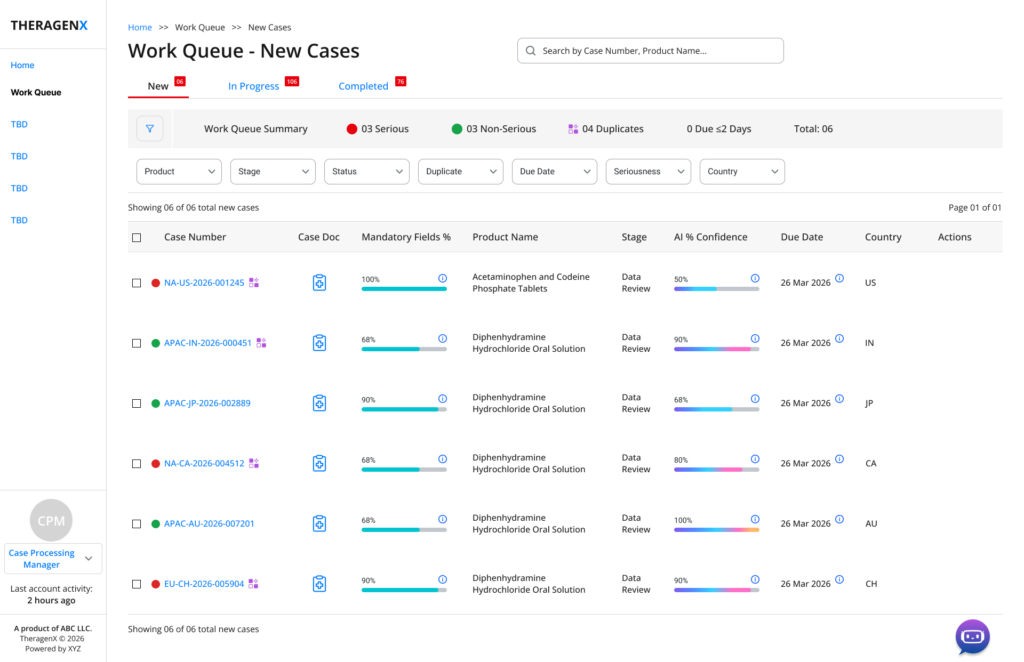
work queue – New Cases, with seriousness, duplicate and due-date counts surfaced above the table.
6.2 Assignment Center — workload-aware, AI-recommended routing
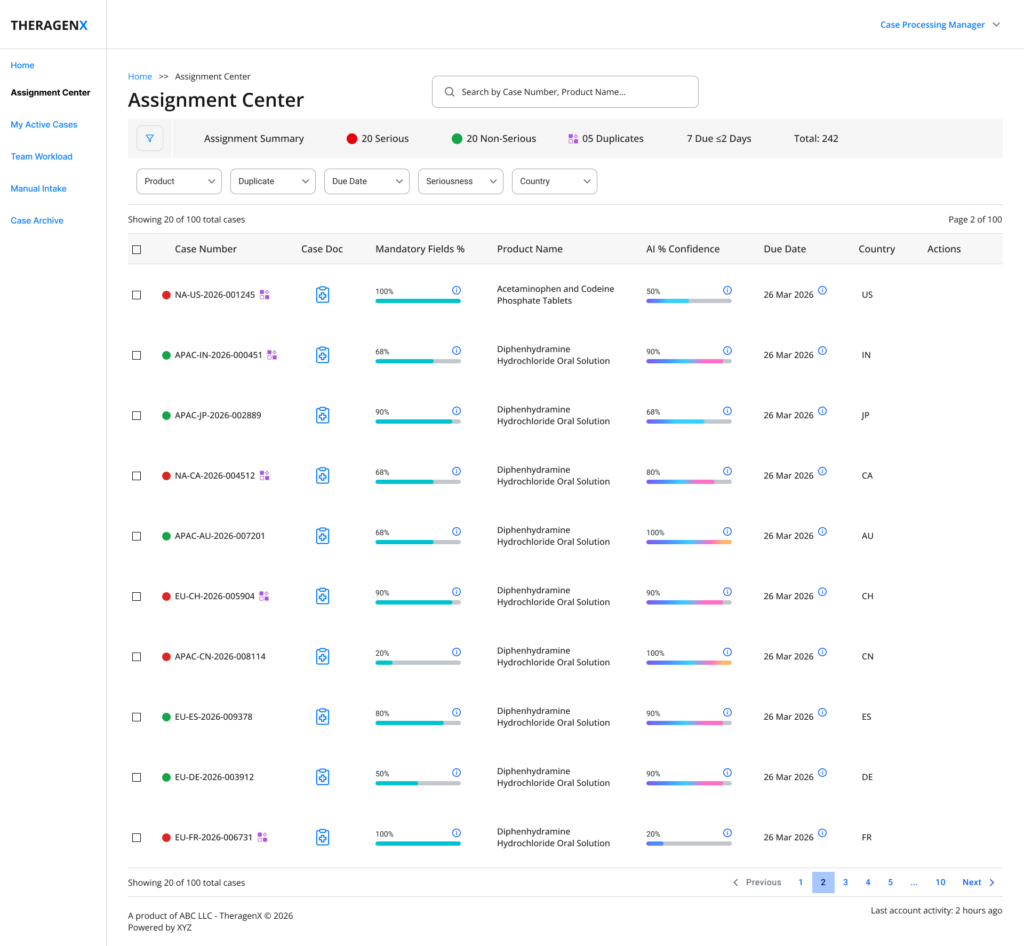
Assignment Center – the full case table with Product, Duplicate. Due date, Seriousness and Country Filters.
Assigning a case surfaces a ranked list of data-entry team members with their current serious/non-serious caseload, and highlights one candidate as “AI Recommended” based on that workload balance — turning a decision that used to require tribal knowledge of who’s overloaded into a one-glance choice.
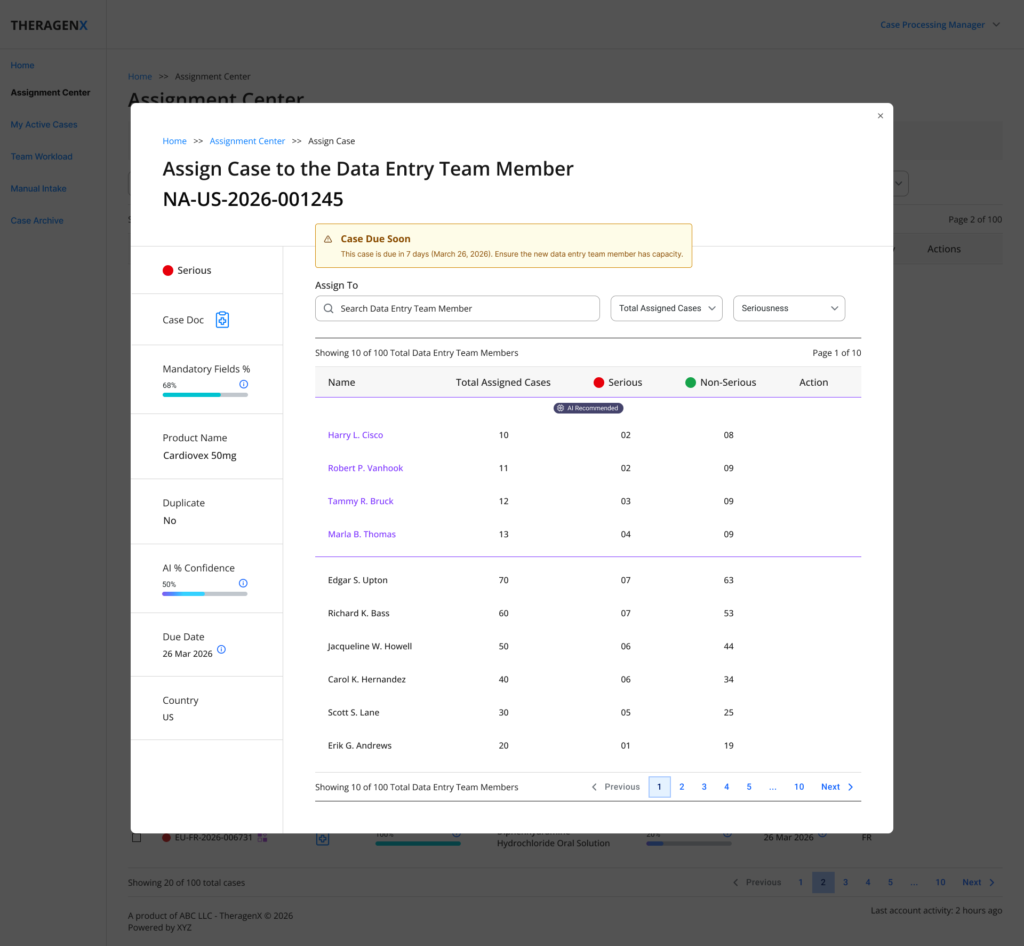
Assign Case modal – AI-recommended assignee surfaced at the top of a sortable workload table
Two details were deliberate risk-reduction choices. First, a successful assignment shows an inline confirmation with an immediate Undo, rather than silently closing the modal — so a mis-click has a two-second, zero-cost recovery path.
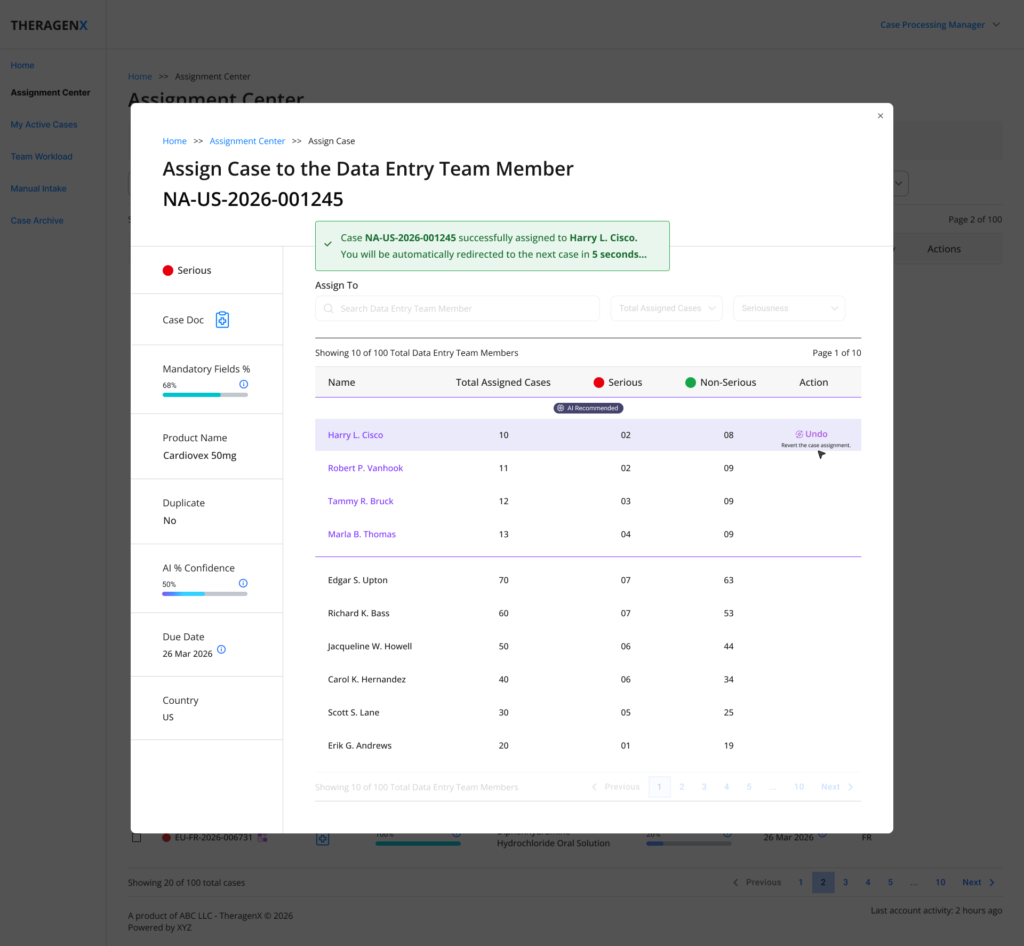
Post-assignment confirmation with a five-second Undo window before auto-advancing to the next case.
Second, when a case is close to its regulatory due date, the modal replaces the confirmation with an explicit “Case Due Soon” warning — asking the manager to confirm the new assignee has capacity, rather than letting a deadline slip silently into someone’s backlog.
6.3 AI Extraction Summary — the trust hand-off
Before a processor opens a case, the AI Extraction Summary gives them an honest scorecard: overall AI confidence, mandatory-field completion, and a confidence distribution across every extracted field — then lists the specific low-confidence fields by name, with their individual score, so the processor knows exactly what to scrutinise first instead of re-checking everything uniformly.
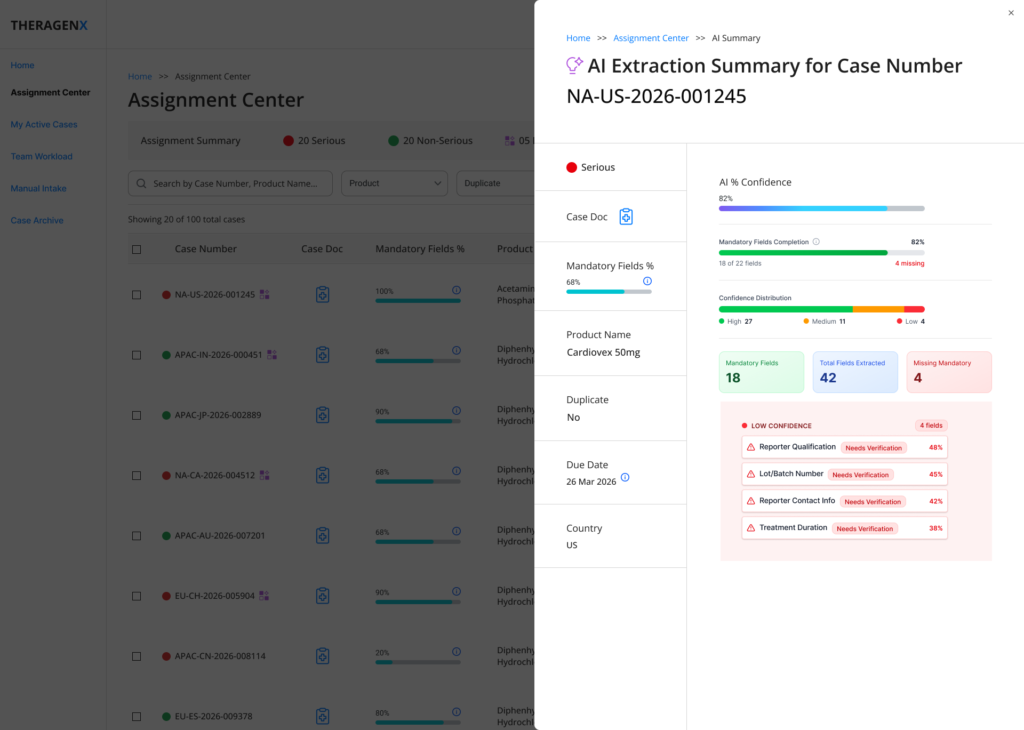
AI Extraction Summary – confidence distribution and named low-confidence fields (Reporter Qualification, Lot/Batch Number, Reporter Contact Info, Trearment Duration).
This screen is the moment the product asks for trust, so it was designed to earn it rather than assert it: showing 42 total fields extracted against 18 mandatory fields completed, rather than collapsing everything into one green checkmark, keeps the AI’s actual coverage — and its gaps — visible before the human ever touches the case.
6.4 Case Review workspace — source document beside structured data
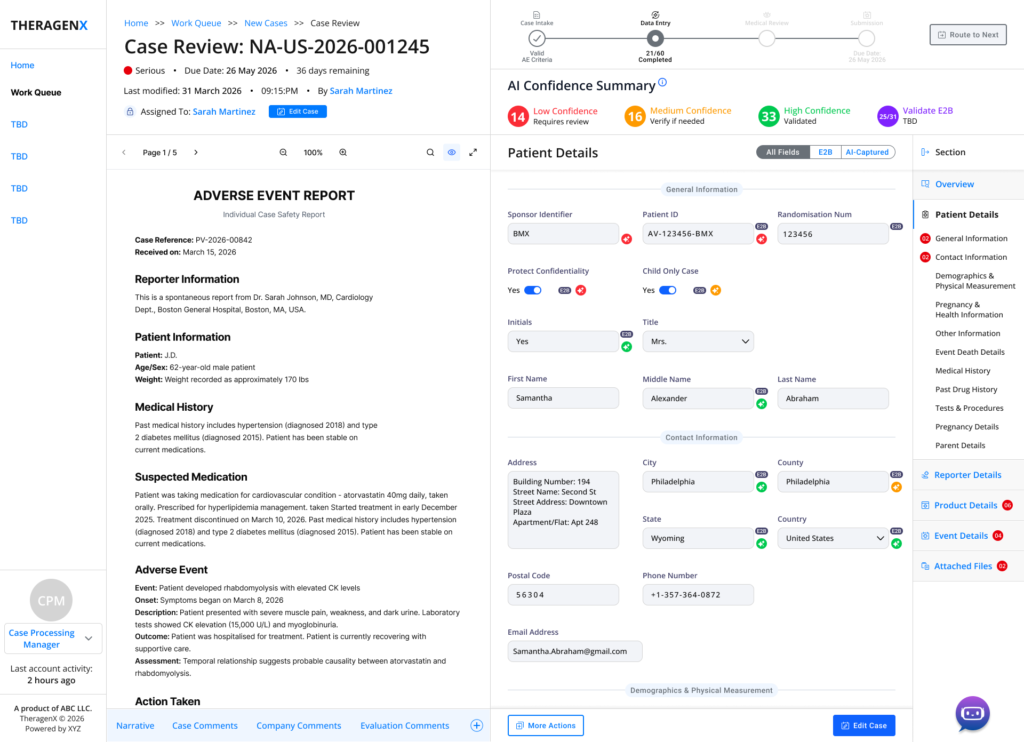
Case Review workspace – source PDF on the left, structured Assessment Details on the right, lifesycle stepper and AI Confidence Summary pinned above.
This is the core workspace. The lifecycle stepper (Case Intake → Data Entry → Medical Review → Submission) and the AI Confidence Summary (counts of Low / Medium / High-confidence fields, plus E2B validation progress) stay pinned at the top regardless of which section a processor is working in, so “where am I in the process” is never a scroll away.
A left-hand section rail (Overview, Patient Details, Reporter Details, Product Details, Event Details, Attached Files) lets a processor jump straight to the part of the case that needs attention, with a red count badge on any section that still has outstanding low-confidence fields — turning the navigation itself into a to-do list.
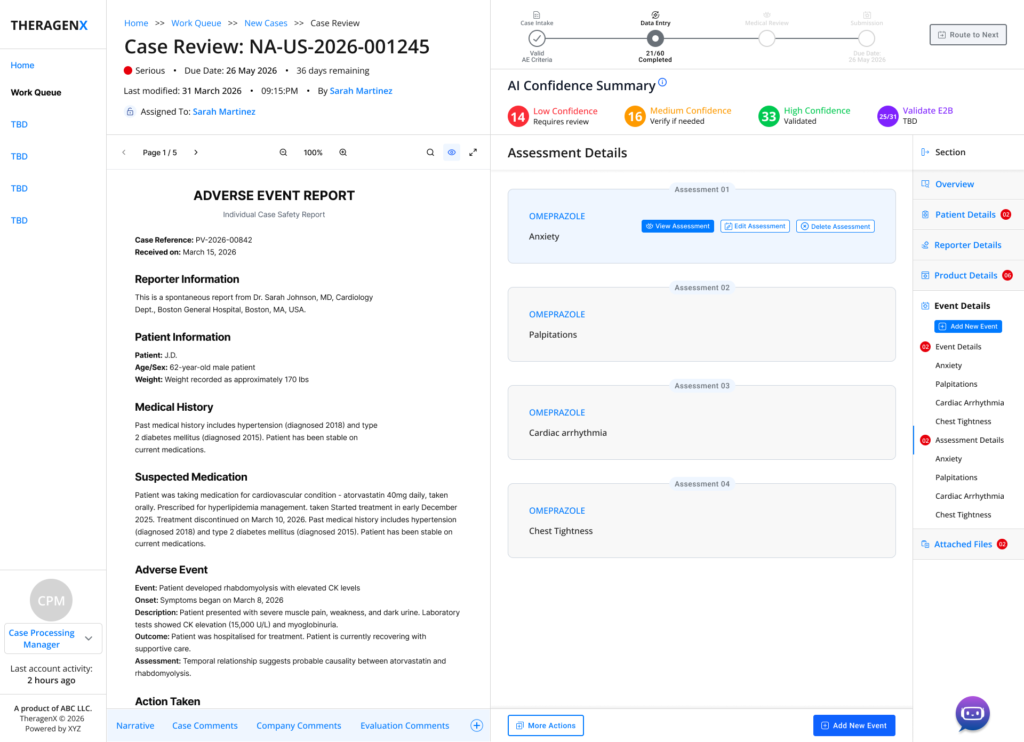
Assessment Details – causality assessments grouped by suspect product, each with View / Edit / Delete actions.
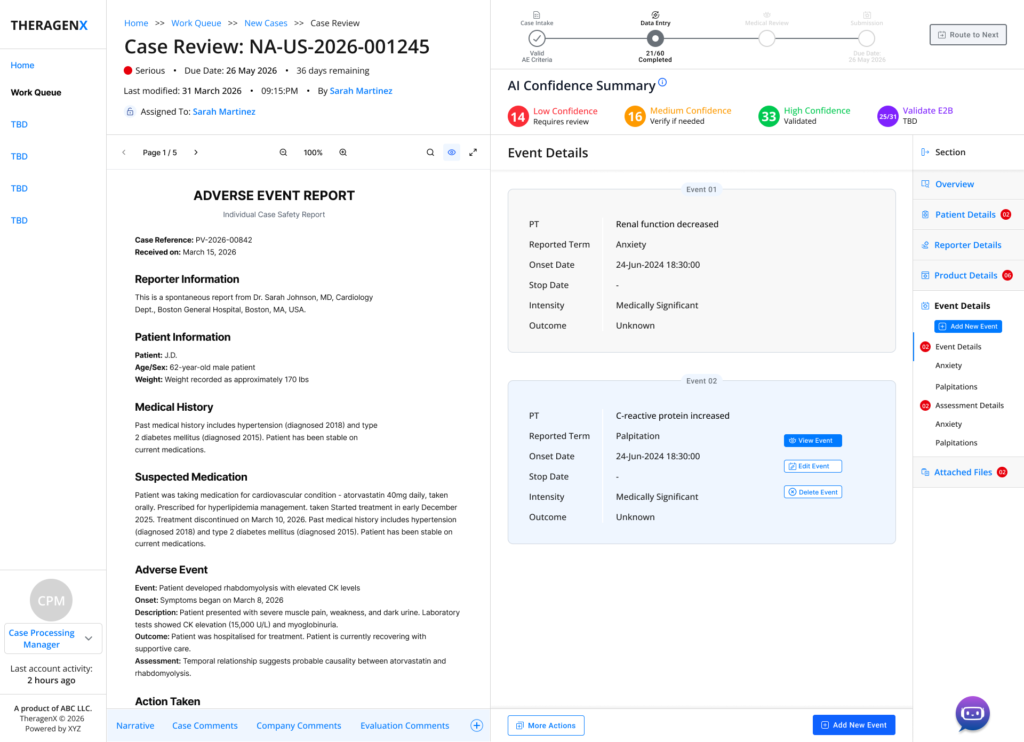
Event Details – structure MedDRA-style event records (Preferred Term, Reported Term, onset, intensity, outcome) alongside the source narrative.
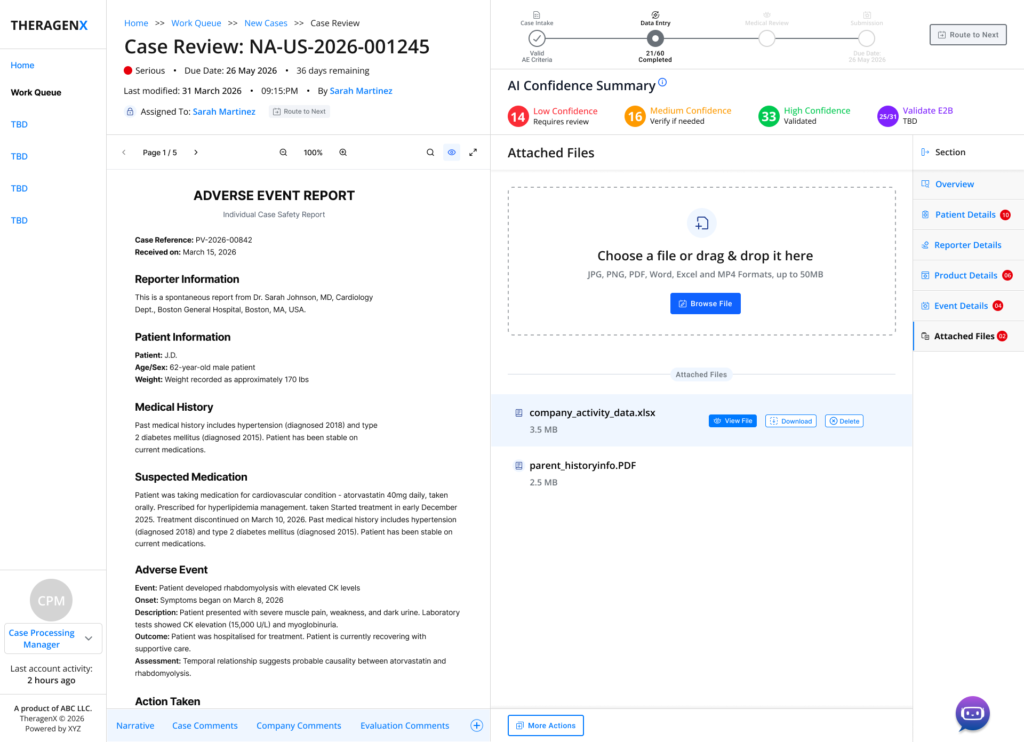
Attached Files – supporting documents (lab data, medical history) stay attached to the case record for audit continuity.
6.5 Confidence-tiered field review — letting attention scale with risk
Inside Patient, Reporter and Product details, fields can be filtered to “All Fields” or to just the AI-Captured subset, and then reviewed one confidence tier at a time. This is the pattern that most directly answers the core design question in Section 3: instead of one long form, the processor works through three purpose-built views.
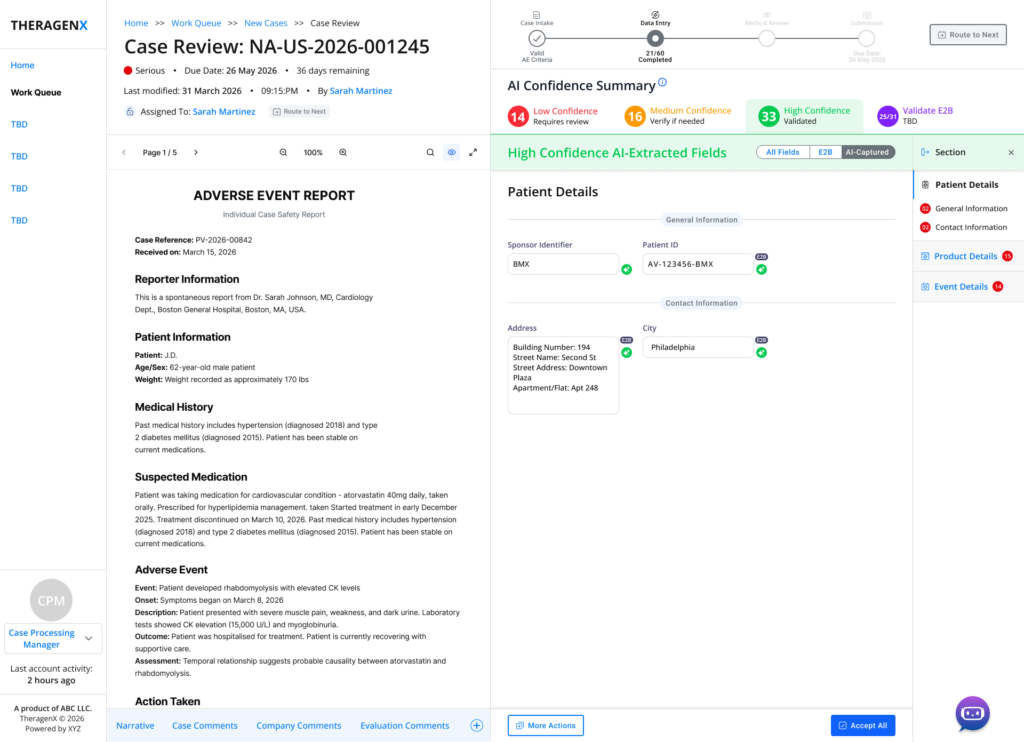
High-confidence fields – green banner, minimal per-field controls, single “Accept All” actions for fast bulk cleareance.
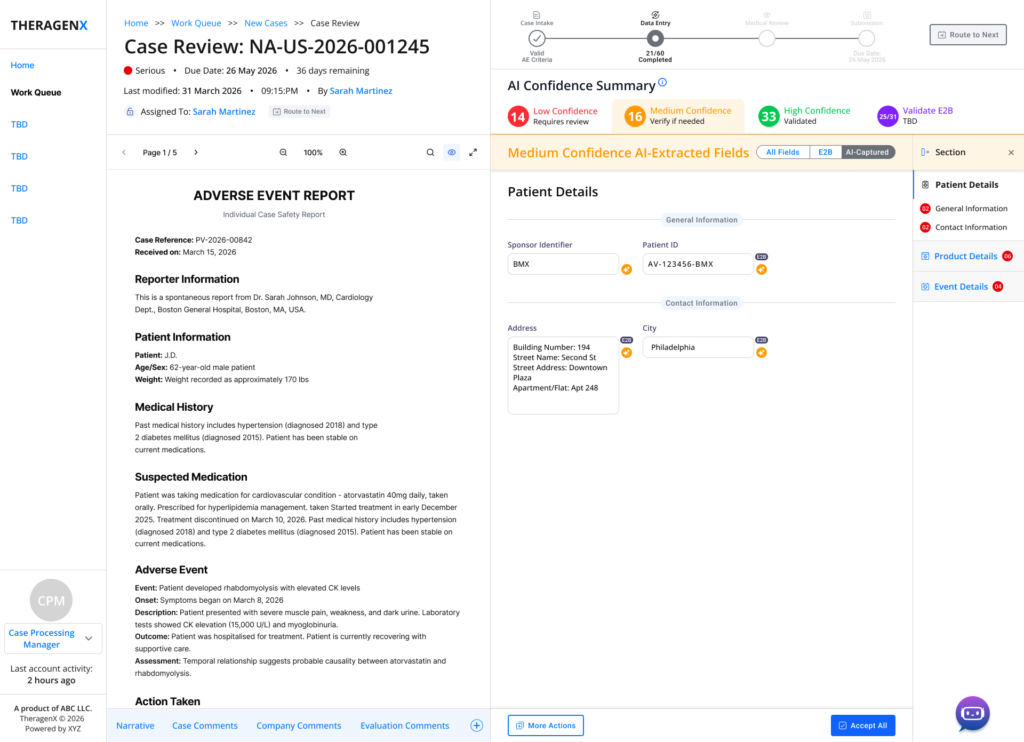
Medium-confidence fields – amber banner, still bulk-actionable, but visually distinct from a verified field.
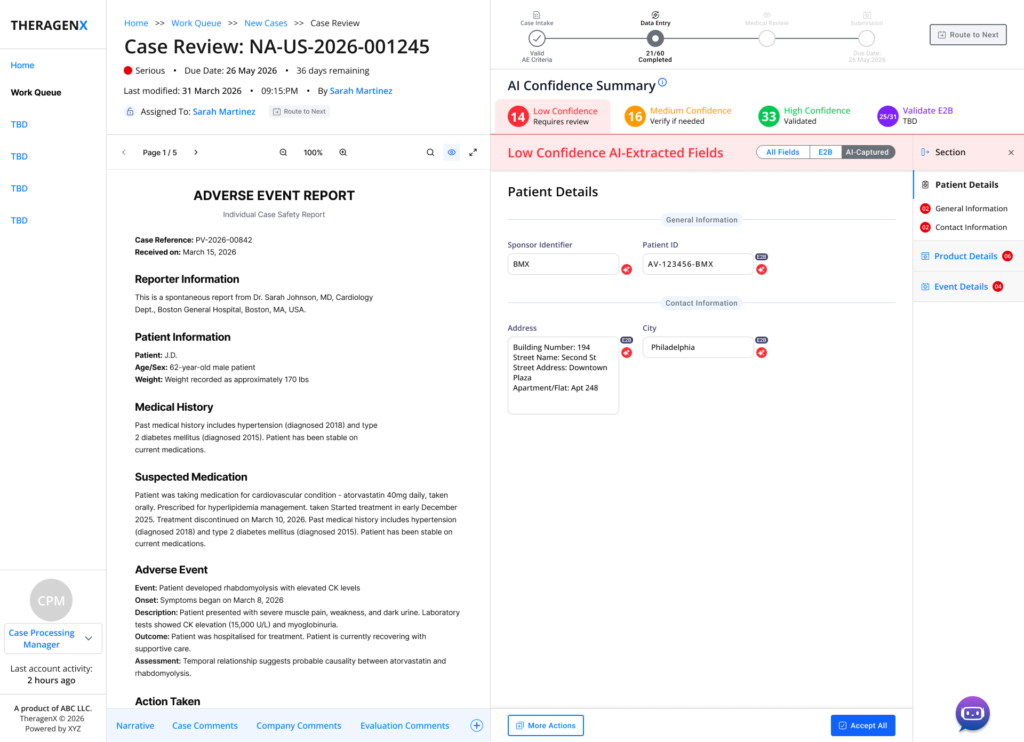
Low-confidence fields – red banner with a red ‘needs correction’ icon on every field, no bulk-accept affordance offered.
The colour, icon and available actions change meaningfully between tiers — High-confidence fields get a lightweight green “accept” marker and a one-click “Accept All”; Low-confidence fields get a red flag on every field and no bulk-accept option at all, forcing a deliberate, field-by-field decision exactly where the AI itself is least sure. The system’s uncertainty becomes the reviewer’s roadmap.
Every accepted or corrected value is also logged in a Case Comments thread, where an “AI Draft” assist can propose a structured audit note (e.g. “Corrected dosage from 500 mg to 250 mg based on source document”) for the processor to edit and finalise — turning routine verification into a defensible written record without the manual burden of writing one from scratch.
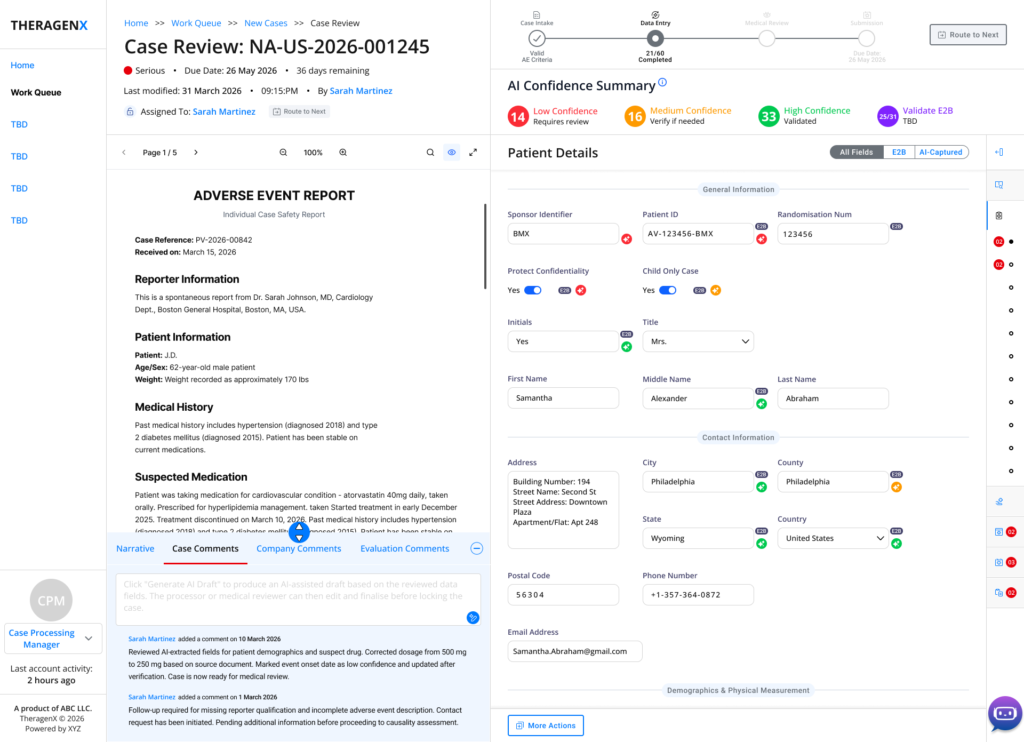
Case Comments – AI-drafted audit note alongside the reviewer’s own dated comment history, next to the live Patient Details form.
6.6 Duplicate case detection — explainable AI, not a black box
Because the same adverse event is often reported to a company more than once — by the physician and separately by the patient, for instance — TheraSafe flags likely duplicates automatically and scores the match. Critically, the AI shows its work: a “Why flagged as duplicate” panel lists the specific matching signals (same date of birth, same suspect product, event dates within one day) rather than a bare 92% confidence number.
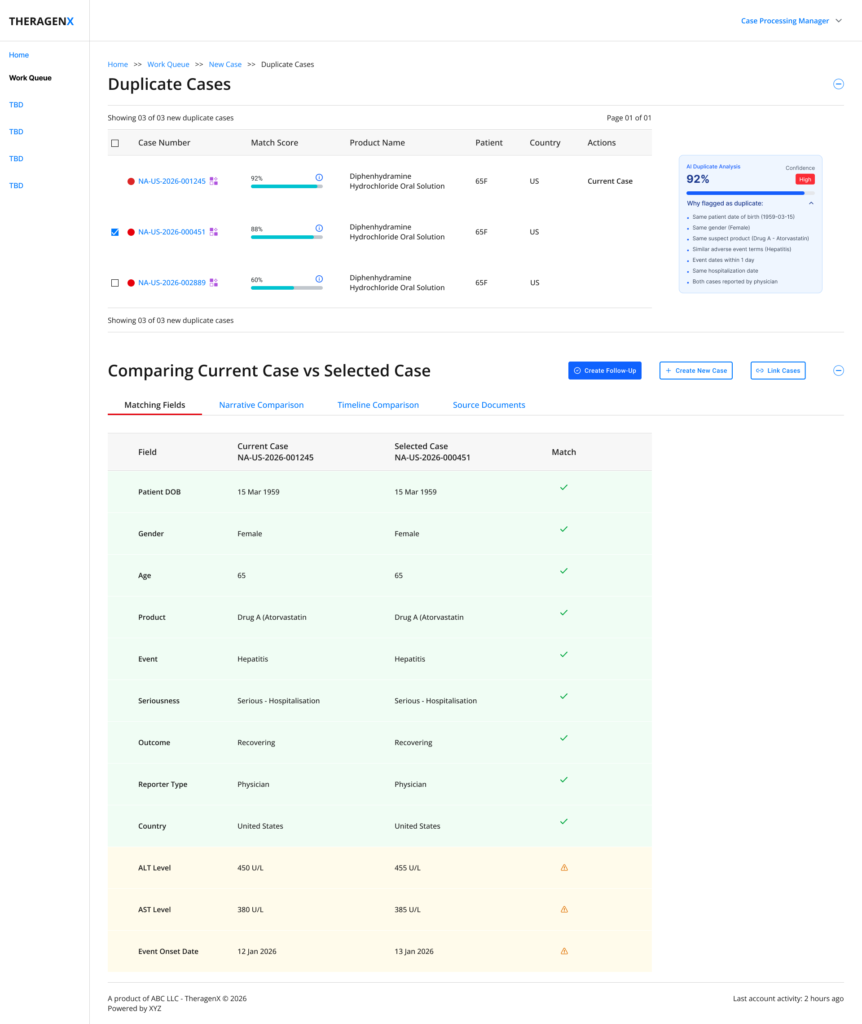
Duplicate Cases – AI Duplicate Analysis with explicit reasoning, and a field-by-field match table (green check vs. amber discrepancy)
From there, three purpose-built comparison views let the processor confirm or reject the match on its merits instead of taking the score on faith:
- Narrative Comparison — the two case narratives shown side by side with shared terms highlighted, so a reviewer can visually confirm the clinical story matches.
- Timeline Comparison — key dates (drug start, event onset, hospitalisation, receipt) aligned in a table and a visual timeline, each marked Exact Match or flagged with the day difference.
- Source Documents — the two original source reports rendered side by side with the matching values highlighted, for the moment a reviewer needs to go back to primary evidence.
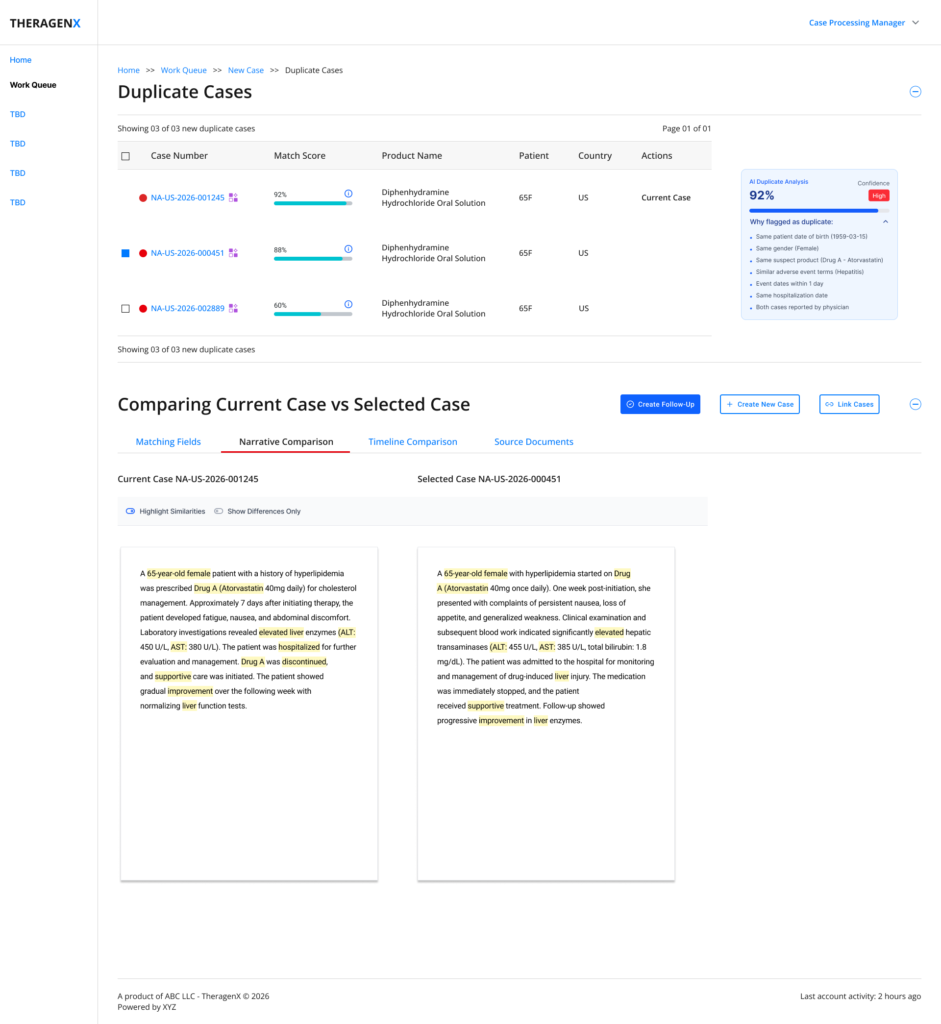
Narrative Comparision – shared clinical language highlighted across both case narratives.
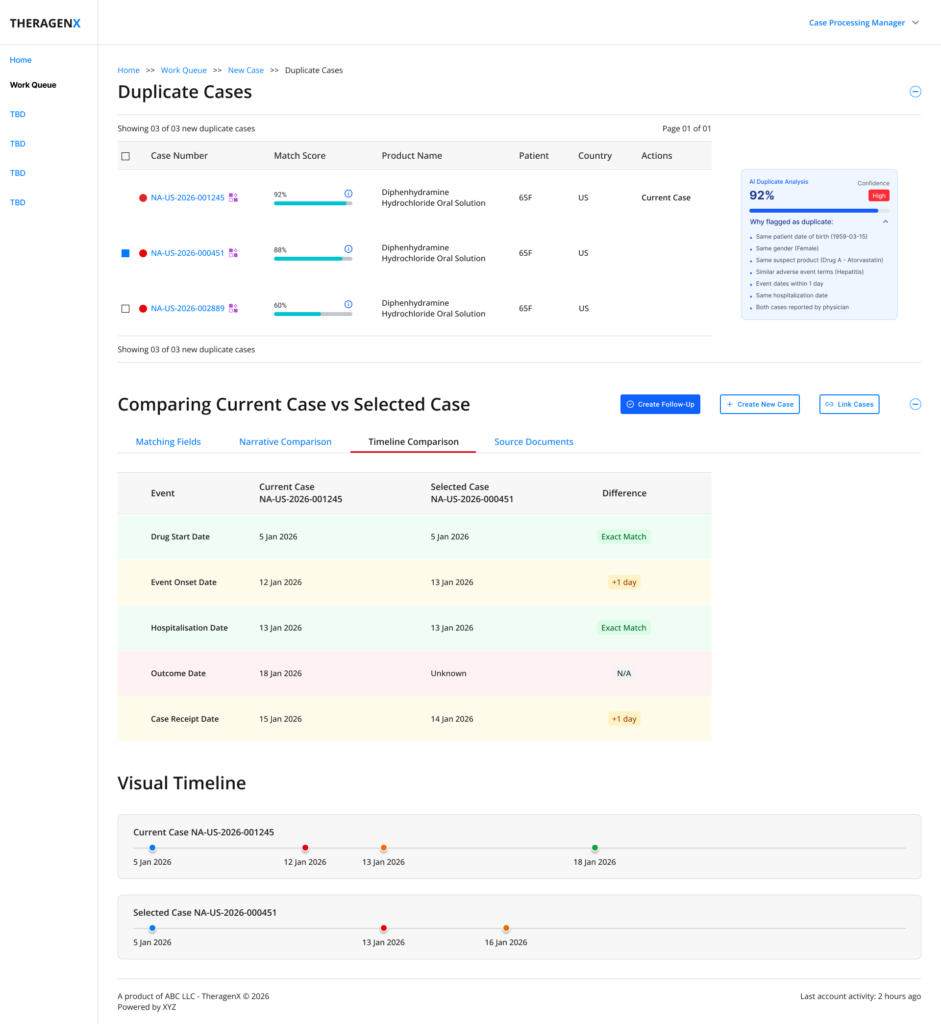
Timeline Comparison – tabular diffrences plus a visiual timeline for both cases.
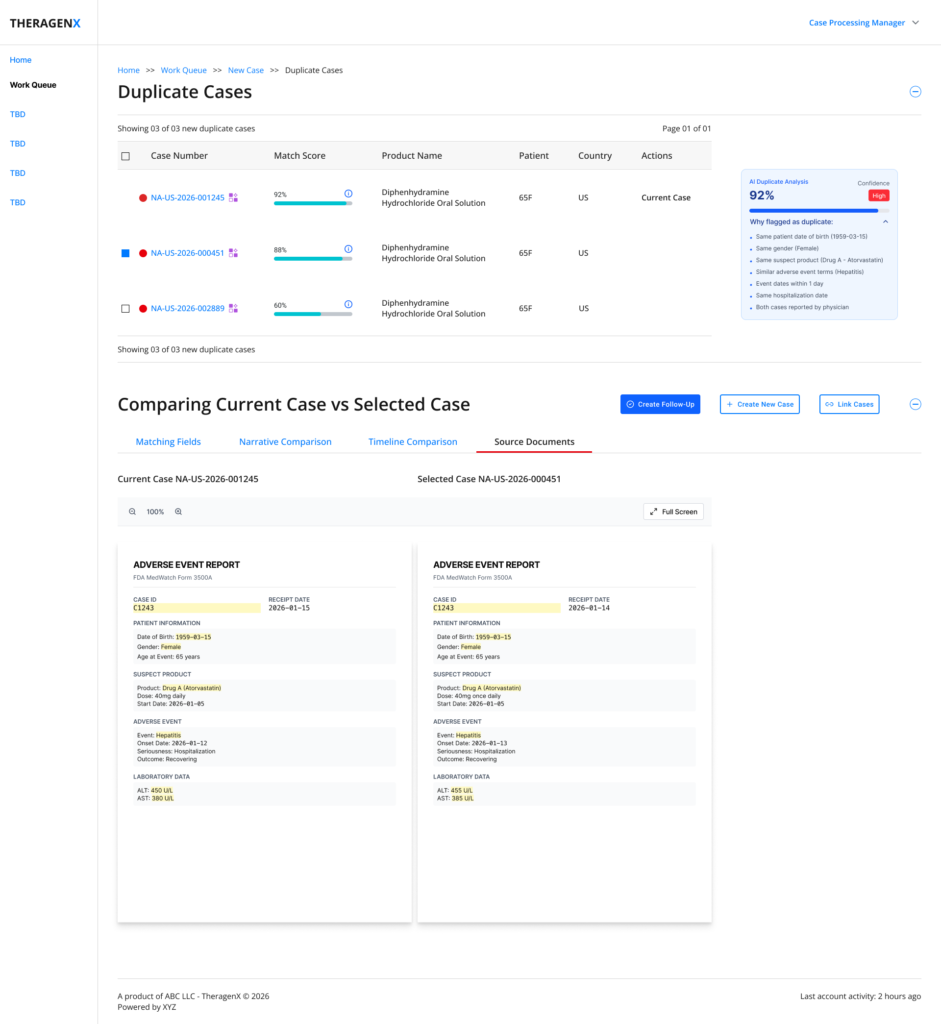
Source Documents – original adverse-event reports compared side by side with matching fields highlighted.
The action bar — Create Follow-Up, Create New Case, Link Cases — keeps every outcome of a duplicate review one click away, so confirming a match doesn’t dead-end the workflow.
6.7 E2B validation — making submission-readiness legible
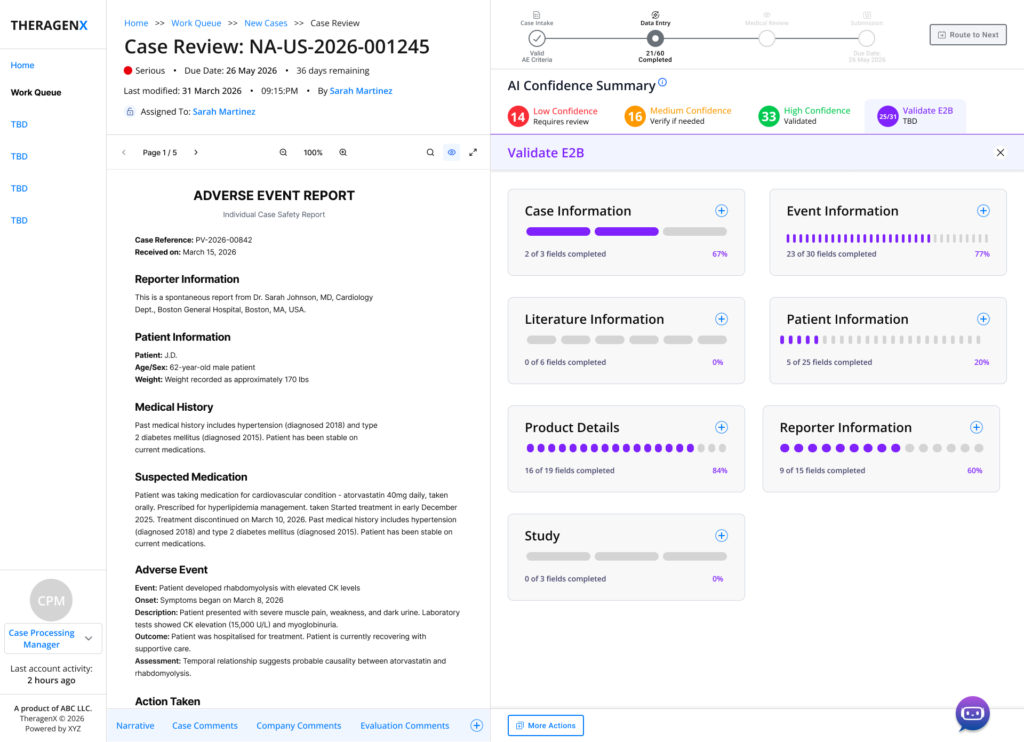
Validate E2B – completion broken down by regulatory section (Case, Event, Literature, Patient, Reporter, Study Information), each with its own percentage.
E2B is the regulatory data-exchange format cases must satisfy before submission, and “68% complete” as a single number hides which of dozens of required sections is actually the blocker. Breaking validation into per-section progress — Patient Information at 20%, Product Details at 84% — turns a vague compliance gate into a specific, actionable punch list a processor can work through in priority order.
This same validation count is echoed as a persistent badge in the AI Confidence Summary bar across every screen in the workspace, so submission-readiness is always one glance away, never a separate report a processor has to remember to run.
7. Design Principles Established
- Show confidence, not just output. Every AI value carries a visible tier (High / Medium / Low) and, where it matters, the reasoning behind it — never a bare answer with no provenance.
- Calibrate effort to risk. Bulk actions exist where the AI is confident; they disappear where it isn’t. The interface itself signals how much scrutiny a value deserves.
- Make every action reversible or logged. Assignments can be undone; edits are captured in an audit-ready comment thread. Nothing regulatory-relevant happens silently.
- Never separate evidence from data entry. The source document stays pinned beside the structured form throughout review — verification never requires losing your place.
- Turn compliance gates into punch lists. Aggregate completion percentages are broken into named, actionable sections wherever they gate a real decision or deadline.
- Explain AI judgement calls. Duplicate-match scores, recommended assignees and confidence scores are always paired with the specific signals behind them.
8. Challenges & Trade-offs
- Density vs. speed. Case processors handle high volumes daily and wanted density; medical reviewers wanted more breathing room for judgement calls. The confidence-tier filters and collapsible sections let both use the same screens at their own pace, rather than forking the workspace by role.
- Bulk actions vs. audit rigor. An “Accept All” on medium- or low-confidence fields would have sped up throughput but undermined the entire trust model — it was deliberately withheld below the High-confidence tier, even though it was the most-requested shortcut in early reviews.
- Surfacing AI uncertainty without eroding trust in the product. Showing “14 fields need review” up front risks reading as “the AI got it wrong” rather than “the AI is telling you where to look.” Framing, colour and copy (“Requires review” vs. an error state) were tuned to keep the summary feeling like a co-pilot’s briefing, not a failure report.
9. Outcomes & Impact
As an AI-native rebuild of a traditionally manual, form-heavy workflow, the design goals for this module were to compress the time between case receipt and submission-ready status, reduce the rate of missed or mis-entered mandatory fields, and give managers enough visibility into workload and risk to prevent due-date misses before they happen — while keeping every step defensible in a regulatory inspection.
Note: Quantified before/after metrics (processing-time reduction, error-rate change, inspection findings) belong here once real usage data is available from the shipped product. Replace this note with the actual figures — e.g. average time-to-submission, % of cases meeting the 15-day expedited deadline, or reduction in duplicate-case rework — before publishing this case study externally.
10. Reflection
The hardest and most interesting problem in this project wasn’t any single screen — it was deciding what the AI should be allowed to say silently versus what it had to say out loud. A confidence score is easy to add to a UI; making that score change what actions are available, not just what colour a label is, is what turns it into something a regulated user can actually rely on.
The recurring pattern across Work Queue, Case Review and Duplicate Detection — surface a score, then immediately show the reasoning behind it — is the piece of this system I’d carry into any AI-assisted enterprise workflow: confidence without explanation asks for blind trust, and in a regulated domain, blind trust isn’t a feature.